How to Write Logs That Actually Help When Something Breaks
Most logs look fine until the one night you actually need them. Here are three simple habits that turn a wall of useless text into logs your future self will thank you for.
On this page
How to Write Logs That Actually Help When Something Breaks
It's 2am. Something in your app has gone wrong. A customer says they were charged twice, or an email never arrived, and now you're staring at your logs trying to work out what happened.
You scroll. And scroll. Thousands of lines of text, all looking roughly the same, none of them telling you the one thing you need to know. That sinking feeling — my logs are here, but they're useless — is what this post is about, and how to avoid it.
The good news: fixing it isn't hard. It's mostly about a few small habits. Let me walk through them in plain terms.
First, what even is a log?
A log is just a note your program writes down about what it just did. Think of it like a shop's CCTV: while everything's fine, nobody watches it. But the moment something goes wrong, it's the only record of what actually happened.
The problem is that most logs are written like a diary — nice to read one line at a time, useless when you need to answer a real question.
The kind of logs that let you down
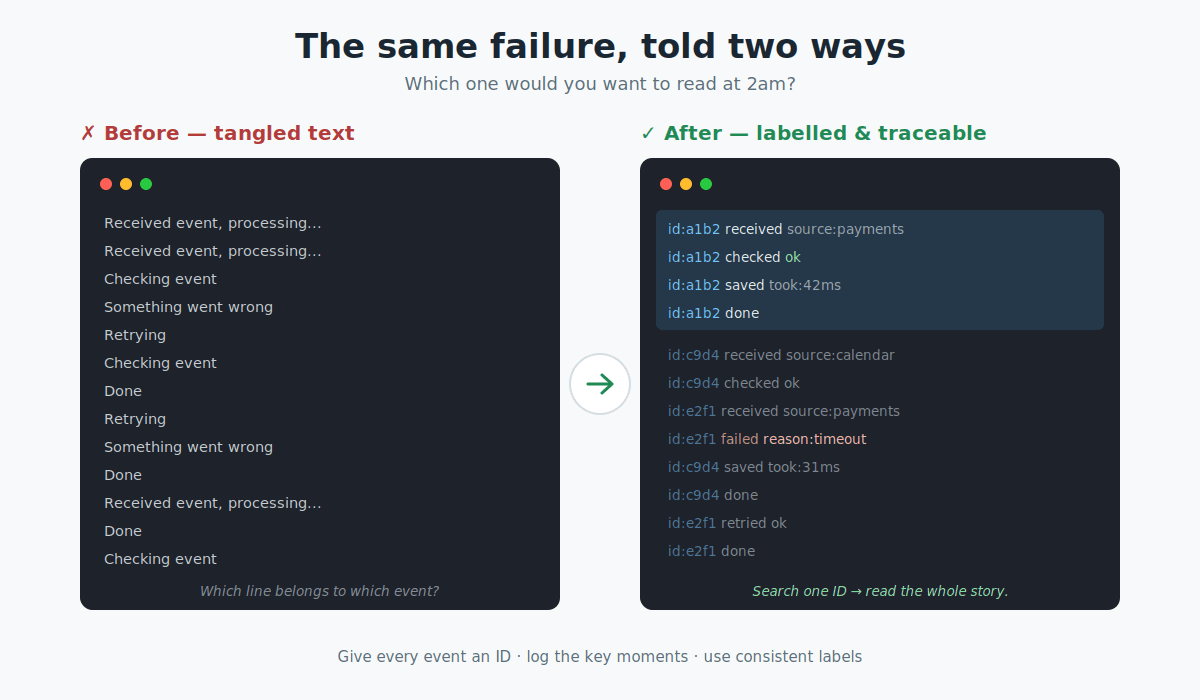
Say your app processes incoming events, and each one writes a line like:
Received event, processing...
Something went wrong
Retrying
Done
Read top to bottom, that seems fine. But now imagine a thousand of those lines, all mixed together from hundreds of events happening at once. Which "Retrying" belongs to which event? Which "Something went wrong" is the one you care about? You can't tell. The logs are technically there, but they can't answer the question you actually have.
A quick word on "webhooks"
A lot of backend systems deal with webhooks. That's just a fancy word for one service poking yours when something happens. A payment company sends your app a little message saying "this customer just paid." A calendar tool pings you when a booking is made.
The catch is you don't fully control these messages. Sometimes the same one arrives twice. Sometimes they show up out of order. Sometimes they quietly fail. Which is exactly why good logs matter so much here — when the outside world misbehaves, your logs are your only witness.
The one habit that changes everything: give every event an ID
Here's the single most useful trick. The moment an event arrives, give it a unique ID — like a tracking number on a parcel. Then attach that same ID to every note you write about it, from start to finish.
Now, instead of scrolling through noise, you search for one ID and see the entire journey of that one event, start to end, in order:
[id: a1b2] Received
[id: a1b2] Checked — looks valid
[id: a1b2] Saved to database
[id: a1b2] Done
That's it. That one habit turns "scroll through thousands of lines and hope" into "search one number and read the story." If the service sending you the event already gives it an ID, use theirs. If not, make one up the instant it arrives.
Log the story, not every whisper
A common mistake is logging everything — every variable, every tiny step. That just buries the important stuff.
Instead, log the moments that matter: the decision points. Received. Checked. Saved. Failed (and why). These are the beats of the story. If you had to explain to a colleague what happened to an event, you'd mention these — not the fifty tiny steps in between.
One warning worth its own sentence: never log sensitive data like passwords, card numbers, or personal medical or customer information. Logs get read by a lot of people; keep private things out of them.
Write logs a computer can read, not just you
Here's the upgrade that makes the rest pay off. Instead of writing logs as free-form sentences, write them as neat, labelled data — the same labels every time:
{ "event_id": "a1b2", "step": "saved", "source": "payments", "took_ms": 42 }It looks a little more formal, but there's a big reason for it. When every log uses the same labels — event_id, step, source — a log tool can search and count them for you. You can ask things like "show me everything for event a1b2" or "how many payment events failed in the last hour" and get an instant answer, instead of counting by hand.
Plain sentences can't do that. Labelled data can. That's the whole difference.
Now you can catch problems on purpose
Remember the customer who got charged twice? With IDs and consistent labels, that problem stops being a mystery. If you ever see two "saved" steps for the same event ID, you know instantly it was processed twice — and you can set up an automatic alert to warn you the moment it happens again, instead of waiting for an angry email.
The same goes for other classic backend headaches, like your database quietly running out of spare connections under heavy load. With structured logs, that shows up as a clear spike in one specific error — visible on a chart, not hidden in a wall of text.
When something does break, cleanup is a search, not a saga
The final payoff shows up during the messy after-the-fact investigation. "How many events failed yesterday? From which source? Which ones were slowest?" With good logs, each of those is a quick search that takes seconds. Without them, it's an afternoon of squinting and guessing.
You've basically turned your logs from a diary into a searchable database — and your future self, at 2am, will be very grateful.
The takeaway
You don't write good logs for the days everything works. You write them for the one day it doesn't — the day you can't predict.
Three habits get you almost all the way there:
- Give every event an ID, and attach it to every line.
- Log the key moments, not every tiny step (and never sensitive data).
- Use consistent labels so a computer can search and count for you.
Do those three things, and the next time something breaks at 2am, your logs will actually have your back.
Comments
Loading comments…