AWS SQS Explained with a Real-World Example: A Complete Guide Using TypeScript
Learn how Amazon SQS works in real-world applications with simple TypeScript examples. Understand producers, consumers, queues, visibility timeout, dead letter queues, and scalable background processing through a practical e-commerce example.
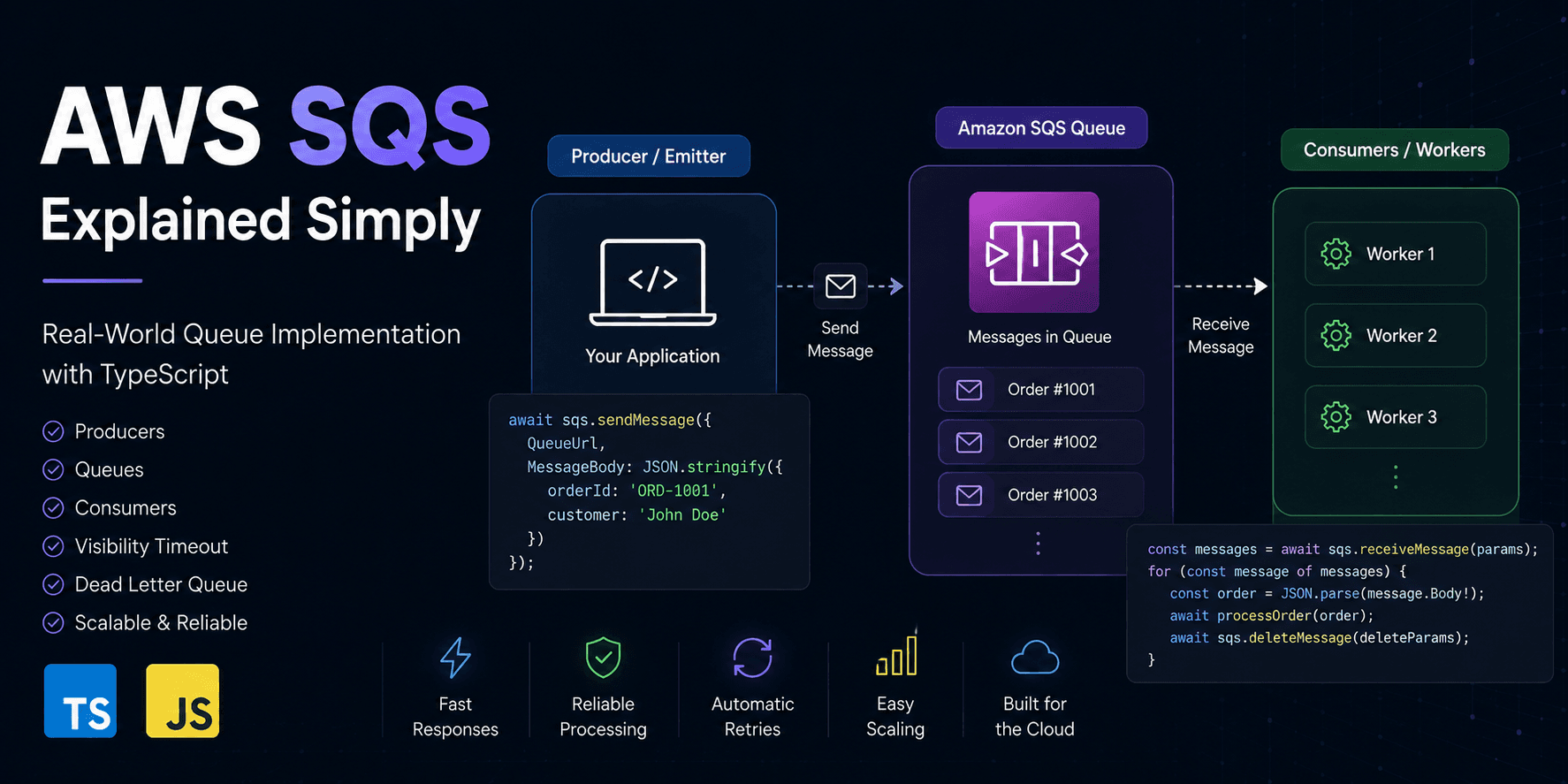
AWS SQS Explained with a Real-World Example
Most tutorials explain Amazon SQS by showing how to send and receive a message.
While that's useful for learning the API, it doesn't answer the most important question:
Why do we need a queue in the first place?
In this guide, we'll build the mental model behind AWS SQS using a realistic e-commerce example and simple TypeScript snippets.
Imagine You're Building an E-commerce Website
A customer clicks Place Order.
Customer
    │
    ▼
Place Order API
Behind the scenes, several things need to happen.
- Save the order
- Process payment
- Send confirmation email
- Reduce inventory
- Generate invoice
- Notify warehouse
- Update analytics
A beginner might write something like this:
async function placeOrder(order) {
  await saveOrder(order);
  await chargePayment(order);
  await reduceInventory(order);
  await sendEmail(order);
  await generateInvoice(order);
  await notifyWarehouse(order);

  return {
    success: true,
  };
}
Looks perfectly fine.
But imagine the email service is slow.
Or the warehouse API is temporarily unavailable.
Now your customer has to wait.
Sometimes the request even times out.
That's not a great user experience.
The Better Approach
Instead of doing everything immediately, we only perform the essential work.
Customer
      │
      ▼
Place Order API
      │
 Save Order
      │
      ▼
Return Success ✅
Everything else can happen in the background.
That's exactly what AWS SQS is designed for.
Think of SQS as a Waiting Line
Imagine a bank.
Customers arrive continuously.
Employees cannot serve everyone instantly.
Instead, people wait in a queue.
Customer

↓

Queue

↓

Employee
Amazon SQS works exactly the same way.
Application

↓

Amazon SQS

↓

Background Workers
The Three Main Components
Every queue-based system contains only three important parts.
Producer

↓

Queue

↓

Consumer
Let's understand each one.
Producer (Emitter)
The producer creates messages.
It doesn't process anything.
Its only responsibility is sending information to the queue.
await sqs.sendMessage({
  QueueUrl,
  MessageBody: JSON.stringify({
    orderId: "ORD-1001",
    customer: "John Doe",
  }),
});
Think of it like dropping a package into a courier service.
Once it's sent, the producer's job is finished.
Queue
The queue safely stores incoming messages.
Queue

──────────────

Order #1001

Order #1002

Order #1003

Order #1004

──────────────
If workers are busy, the messages simply wait.
Nothing gets lost.
Consumer (Worker)
Consumers continuously check the queue for new work.
while (true) {
  const messages = await receiveMessages();

  for (const message of messages) {
    await processOrder(message);
  }
}
This loop runs forever.
Whenever a new message arrives, the consumer processes it.
Complete Request Flow
Customer

│

Clicks Place Order

│

▼

Order API

│

Save Order

│

▼

Producer

│

Send Message

│

▼

Amazon SQS Queue

│

Stores Message

│

▼

Consumer

│

Processes Order

│

├── Send Email

├── Reduce Inventory

├── Generate Invoice

└── Notify Warehouse
Notice something important.
The customer doesn't wait for these background tasks.
The API responds almost immediately.
What Happens if the Consumer Crashes?
Suppose the worker receives a message.
Worker

↓

Receives Message

↓

Server Crashes 💥
Is the message lost?
No.
Amazon SQS temporarily hides the message instead of deleting it.
If the worker crashes before completing the task, the message automatically becomes available again.
Another worker can continue processing it.
Worker A ❌

↓

Message Returns

↓

Worker B ✅
Visibility Timeout
Receiving a message doesn't delete it.
Instead, SQS hides it for a configurable amount of time.
Queue

↓

Receive Message

↓

Invisible

↓

Processing

↓

Delete on Success
If processing succeeds:
✅ Delete the message.
If processing fails:
The message becomes visible again for another worker.
This mechanism is called the Visibility Timeout.
Dead Letter Queue (DLQ)
Sometimes a message keeps failing.
Example:
{
  "orderId": null
}
Every consumer throws an error.
Instead of retrying forever, SQS moves the message to a separate queue.
Main Queue

↓

Retry

↓

Retry

↓

Retry

↓

Dead Letter Queue
Now developers can inspect the failed message without affecting the rest of the system.
Scaling is Easy
Suppose today your application receives
- 10 orders per minute.
One consumer is enough.
Tomorrow it's Black Friday.
Now you receive
- 5,000 orders per minute.
Do you change the API?
No.
You simply start more workers.
Queue

│

├── Worker 1

├── Worker 2

├── Worker 3

├── Worker 4

└── Worker 5
Every worker processes different messages.
A Simple TypeScript Example
Producer
export async function createOrder(order: Order) {
  await database.save(order);

  await sqs.sendMessage({
    QueueUrl,
    MessageBody: JSON.stringify(order),
  });

  return {
    success: true,
  };
}
Consumer
while (true) {
  const messages = await receiveMessages();

  for (const message of messages) {
    const order = JSON.parse(message.Body!);

    await sendEmail(order);

    await updateInventory(order);

    await generateInvoice(order);

    await deleteMessage(message);
  }
}
Notice how the API never sends emails directly.
The consumer owns that responsibility.
Benefits of Using SQS
Without a queue:
- ❌ Slow APIs
- ❌ Request timeouts
- ❌ Poor scalability
- ❌ Tightly coupled services
With SQS:
- ✅ Fast API responses
- ✅ Reliable background processing
- ✅ Automatic retries
- ✅ Better fault tolerance
- ✅ Independent services
- ✅ Easy horizontal scaling
Final Thoughts
Amazon SQS isn't just another AWS service.
It's a simple but powerful way to separate responsibilities between different parts of your application.
The producer creates work.
The queue stores work safely.
The consumer performs the work.
Once you understand this pattern, you'll notice it everywhere—from payment systems and email notifications to video processing, chat applications, and event-driven microservices.
Building reliable software isn't about making everything happen immediately.
It's about making sure every task eventually gets done, even when services fail, traffic spikes, or unexpected errors occur.
That's exactly what AWS SQS helps you achieve.
Comments
Loading comments…